“Crypto apps” isn’t one category—it’s an entire toolkit. Wallets, exchanges, portfolio trackers, price alerts, DeFi dashboards, tax tools, and security apps all solve different problems. The key is choosing the right mix for your goals while keeping safety first.
In this guide, you’ll learn the main types of crypto apps, what each one does best, the red flags to avoid, and a simple way to build a reliable “crypto app stack” for your level—beginner, investor, trader, or DeFi user.
What are crypto apps?
Crypto apps are mobile or desktop applications used to buy, sell, store, track, research, or protect digital assets (like Bitcoin, Ethereum, stablecoins, and tokens). Some apps are centralized (a company runs the platform), while others are decentralized (you interact with blockchain protocols through a wallet).
In practical terms, most people use these apps for:
- Storage & access: wallets to hold keys and sign transactions
- Trading: exchanges, DEX aggregators, trading terminals
- Tracking: watchlists, portfolio performance, alerts
- DeFi activity: swaps, lending, staking, on-chain dashboards
- Security: device hardening, password managers, hardware wallets
- Compliance: tax reports, cost basis, transaction exports
Before you download anything: the #1 rule
Never type your seed phrase (recovery phrase) into anything except a wallet restore screen you fully trust. Most “crypto app” scams are fake wallets that steal recovery phrases. So if an app, website, or “support agent” asks for your seed phrase, treat it as a scam.
For a deeper security foundation, start here: Ultimate crypto security guide (self-custody).
The main types of crypto apps (and what they’re actually for)
1) Wallet apps (custodial vs self-custody)
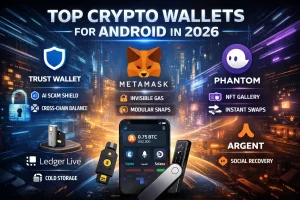
A wallet app is how you hold and use crypto. There are two main models:
- Custodial wallets: an exchange or company holds the keys for you. This is simpler; however, you have less control.
- Self-custody wallets: you control the keys yourself. It takes more responsibility, but it can be safer when done right.
Best for: anyone who wants to store assets, interact with DeFi, or move funds between platforms.
If you want a step-by-step setup, see: How to create a crypto wallet.
Wallet app checklist
- Supports the chains you actually use (for example, Ethereum or Solana)
- Backup and recovery are clear (seed phrase and any cloud options explained)
- Built-in warnings or transaction simulation (nice-to-have)
- Hardware wallet support (a strong plus for serious holders)
2) Exchange apps (CEX)
Exchange apps let you buy and sell crypto with bank transfers, cards, or stablecoins. For beginners, they are often the easiest on-ramp. Still, they come with custody risk because you are trusting a company.
Best for: buying your first crypto, converting between coins, and setting up simple recurring buys.
Compare features and safety considerations here: Best crypto exchanges (review & comparison).
Exchange app checklist
- Strong security options (app-based 2FA, withdrawal allowlists, and passkeys if available)
- Clear fees (trading fees, spread, and withdrawal fees)
- Proof-of-reserves or transparency reporting (if offered)
- Reliable support and a clear account recovery process
3) Portfolio tracker apps
Portfolio trackers help you monitor performance across exchanges and wallets. Some are manual (you enter holdings), while others connect via read-only APIs. As a result, a good tracker reduces chaos—especially if you use multiple platforms.
Best for: investors, multi-wallet users, and anyone tracking performance and allocations.
Start with: Best crypto portfolio trackers.
4) Price alert apps
Price alert tools notify you when a price level, percent move, or market condition happens. Therefore, they can reduce “chart addiction” while still keeping you informed.
Best for: investors and traders who want signals without constant checking.
Full setup guide: Best crypto price alert tools + setup guide.
5) Charting & trading terminal apps
These apps focus on charting and technical analysis (indicators, trendlines, alerts) and, in some cases, advanced order tools. They can be useful; however, they may also encourage overtrading if you don’t have rules.
Best for: active traders with a clear plan and risk limits.
6) DeFi apps (dApps) and wallet “browsers”
In DeFi, your wallet becomes the “login.” You connect to decentralized apps for swaps, lending, staking, and more. Many wallets also include a built-in dApp browser or connection tools, so access is fast.
Best for: users who want on-chain swaps, yields, and protocol access.
DeFi safety essentials
- First, use a separate wallet for DeFi so your main savings wallet stays isolated.
- Next, revoke token approvals periodically, especially after one-time swaps.
- Also, never sign transactions you don’t understand.
- Finally, stick to official links and reputable protocols whenever possible.
7) Tax & reporting apps
Tax apps help you import transactions, calculate cost basis, and generate reports. Even if you don’t trade often, keeping clean records early can save headaches later.
Best for: anyone who trades, swaps, or uses multiple wallets and exchanges.
Learn the basics here: Crypto tax optimization.
Some of the most important “crypto apps” aren’t crypto apps at all. Instead, they protect your accounts and devices:
- Password manager (unique passwords everywhere)
- Authenticator app (app-based 2FA)
- Device security tools (OS updates, anti-phishing, and permission control)
- Hardware wallets for long-term storage
If you’re storing meaningful value, consider hardware wallets as a long-term layer: Best cold wallets (hardware) guide.
How to choose the right crypto apps (a simple decision framework)
Instead of downloading everything, decide your primary use case first. For example, long-term investors usually need fewer apps than active traders. As a result, your setup stays simpler and safer.
| Your goal | Apps you need | Nice-to-have |
|---|
| Buy & hold long term | Exchange + self-custody wallet + security tools | Portfolio tracker, price alerts |
| Active trading | Exchange + charting + alerts | Trading terminal, journaling |
| DeFi yields & swaps | Self-custody wallet + on-chain dashboard | Approvals manager, risk monitor |
| Multi-wallet investor | Portfolio tracker + alerts + security tools | Tax software |
The “trust triangle” test
Before trusting an app with funds or keys, check these three points. That way, you avoid most common traps:
- Reputation: is it widely used and discussed by credible sources?
- Transparency: does the team publish documentation and clear security guidance?
- Security posture: are there real controls (2FA, withdrawals, permissions, and a clear recovery flow)?
Red flags: crypto apps you should avoid
- Seed phrase requests outside of a legitimate wallet restore process
- “Guaranteed profit” claims, unrealistic APYs, or pressure tactics
- Fake support in social media DMs asking you to “verify” your wallet
- Clone apps with misspelled names or suspicious developer accounts
- Permission overload (for example, a wallet asking for access to your contacts)
- Forced updates via external download links
Safety habit: whenever possible, use the official website to reach the correct app store listing. Then verify the developer or publisher name before installing.
Build your “crypto app stack” (3 ready-to-use setups)
Stack A: Beginner (simple, safe, low maintenance)
- 1 reputable exchange app (on-ramp/off-ramp)
- 1 self-custody wallet for withdrawals
- Authenticator app (2FA)
- Password manager
- Optional: price alerts for BTC/ETH
Stack B: Investor (multi-asset tracking + discipline)
- Self-custody wallet(s), ideally separated (long-term vs spending)
- Portfolio tracker
- Price alert tool (levels + volatility)
- Hardware wallet for larger amounts
- Tax tool if you traded or swapped a lot this year
Stack C: DeFi user (protect the core, isolate risk)
- Two wallets: vault wallet (savings) + DeFi wallet (risk)
- On-chain dashboard / DeFi tracker
- Approvals manager (revoke permissions when done)
- Hardware wallet for the vault wallet
- Strict rules for links and signatures
Must-do settings inside your crypto apps
On exchanges
- Enable app-based 2FA; however, avoid SMS when possible.
- Turn on a withdrawal allowlist if available, so withdrawals go only to pre-approved addresses.
- In addition, use anti-phishing codes (email/login protection) if supported.
- Finally, set a strong passcode and device-level biometrics.
On wallets
- Write down your recovery phrase offline, and store it securely.
- Also, use a separate “vault” wallet for long-term holdings.
- Turn on transaction warnings or simulations if available.
- Be selective with network additions and token imports, especially on new chains.
- Use watchlists with a small number of assets you actually monitor.
- Prefer key levels (support/resistance) over constant micro alerts.
- Meanwhile, set one volatility alert per major asset to catch unusual moves.
Privacy: what crypto apps can see about you
Some apps collect usage analytics, device identifiers, and behavior data. This does not always mean they are “bad.” Still, you should be intentional about privacy:
- Limit permissions (location, contacts, microphone) unless needed.
- In addition, consider separate email addresses for exchanges if you want cleaner separation.
- Be cautious linking wallets to public profiles, because on-chain activity can be traced.
- For larger portfolios, a dedicated device can help (advanced users).
FAQ: quick answers
Do I really need a self-custody wallet if I use an exchange?
For long-term holding of meaningful amounts, yes. Exchanges are convenient; however, they carry platform risk. With self-custody, you control the keys—provided you follow strong security practices.
How many crypto apps should I have?
Usually fewer than you think. Most people can run a clean stack with 3–6 core apps: exchange, wallet, 2FA, password manager, tracker, and alerts.
Can I use the same wallet for everything?
You can, but it’s not ideal. A simple upgrade is separating a vault wallet (long-term) from a hot/DeFi wallet (daily use). That way, one bad signature is less likely to threaten everything.
What’s the safest setup for long-term holding?
In general, a hardware wallet plus strong backups and minimal app exposure is the safest path. Start here: Best cold wallets guide.
Final takeaway
Crypto apps should make your life simpler, not riskier. Choose a small set that matches your goals, turn on key security controls, and separate long-term storage from day-to-day activity. If you want the cleanest path, start with a wallet setup, then add a tracker, and use alerts to stay disciplined instead of watching charts all day.
Disclosure: This article is for informational purposes only and does not constitute investment, legal, or tax advice. Crypto is volatile and risky; do your own research and consider your risk tolerance.